
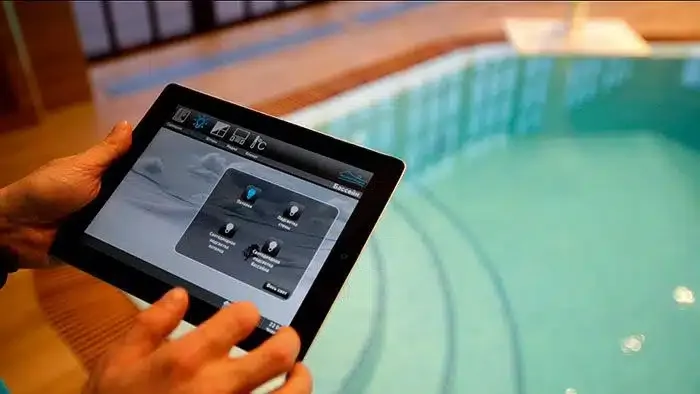
Pool automation is a set of solutions that manage water, temperature, filtration, and safety, reducing human error and saving the owner time.
A properly configured system helps maintain stable parameters, extends the lifespan of equipment, and makes operation predictable.
Modern technologies allow you to integrate key components into a single “ecosystem”: sensors measure parameters, the controller makes decisions, actuators adjust modes, and the user monitors everything in an app. At the design stage, it’s easier to integrate automation into the system right away, and during modernization, select compatible modules and implement them gradually.
Automation Implementation Guidelines: For Stable Operation
The key to reliability is proper architecture: equipment compatibility, correct sensor installation, and clear operating scenarios. Automation shouldn’t be a “black box”—the owner should have transparent modes, an event log, and easy access to manual controls.
Safety and Electrical
- Separate circuits: high-current (pumps, heaters) and low-current (sensors, communications) – with proper shielding and grounding.
- Use RCDs and circuit breakers with appropriate ratings, especially for equipment in humid areas.
- Provide emergency shutdowns: overheating, dry running, leakage, and no flow through the heater.
- Reserve manual mode for maintenance or controller failure.
Sensors: Where Errors Are Most Common
A system is only as accurate as its measurements. Incorrect sensor installation leads to “floating” values and incorrect dosing.
- Install sensors on a bypass with a constant, stable flow, not in areas of turbulence.
- Do not mix reagent injection and measurement points: space is needed to prevent concentration spikes.
- Calibrate electrodes according to regulations and store them correctly, otherwise readings will shift.
- Plan for service access to sensors and fittings for cleaning and replacement.
Practical advice: if you’re at the design stage, it’s easier to immediately lay out the control cabinet, bypass for measurement and dosing, space for flow/pressure sensors, and cable channels. This way, the automation will look “original” rather than added later.
If you’re looking for a comprehensive turnkey solution, it’s more convenient to order pool construction at https://aqualand-pools.com/, specifying your desired scenarios: pH/disinfection maintenance, filtration schedules, remote access, leak monitoring, and heating control.
Bottom line: pool automation ensures stable water quality, resource savings, and comfort, but requires proper design, proper sensor installation, and well-thought-out security. Start with chemicals and filtration, then add heating, scenarios, and remote access – this way, the system will grow without unnecessary modifications.
Equipment Control Scenarios: Ready-Made Ideas for Private and Commercial Pools
Scenario control allows you to combine filtration, heating, chemical dosing, lighting, and attractions into clear modes: “day,” “night,” “guests,” and “service.” This simplifies operation, reduces the risk of personnel errors, and helps maintain stable water parameters.
Pre-made scenarios are best built around events (time, temperature, presence of people, accidents) and safety rules (protection priority, blocking incompatible modes). Below are practical options that can be easily adapted to a specific pool and equipment.
Set of scenarios and final recommendations
For a private pool
- “Weekday/Economy”: filtration by timer and/or pressure, heating by setpoint with night reduction, dosing by ORP/pH with maximum flow limitation.
- “Bathing”: enhanced filtration during occupancy, temperature maintenance without overshooting, soft lighting, counter-current/geyser activation with automatic timer shutdown.
- “Night”: minimum lighting or off, temperature setpoint reduction, quiet pump mode (if supported), leak and level monitoring.
- “Vacation”: reduced filtration, maintaining a safe temperature range, periodic circulation to prevent stagnation, notifications of critical deviations.
- “Shock Treatment”: bathing blocking (indication/notification), increased Circulation, dosing according to a pre-set protocol, return to normal mode after stabilization.
For commercial pools
- “Opening”: preheating/temperature adjustment, sensor check, filtration and UV/ozone start, readiness monitoring according to a checklist (temperature, pH, ORP/chlorine, level).
- “Peak Load”: increased circulation, more frequent monitoring and adjustment of reagents, ventilation/dehumidification priority (for indoor pools) logging of parameters.
- “Shutdown”: gradual shutdown of attractions, night filtration, adjustment of chemicals to target values, automatic backwash if necessary.
- “Filter backwash”: blocking dosing during backwash (or switching to safe mode), controlling valves, monitoring differential pressure before/after, logging events.
- “Emergency/Safety”: protection priority – stopping attractions when water level is low, turning off heating when there is no flow, notifications when pH/ORP/temperature goes beyond limits, “safe circulation” scenario.
Scenario construction rules (for both types)
- Protections have higher priority than comfort: flow, level, overheating, leaks, emergency stops should always override any user modes.
- Do not combine incompatible: blocking for “Shock treatment” and “bathing,” rinsing and dosing, heating and no circulation.
- Make modes transparent: clear names, active mode indication, event and parameter log.
- Enable manual mode: maintenance and diagnostics should be performed without “fighting” the automation, but maintaining protection.
- Configure notifications: critical (immediate) and informational (scheduled), indicating the cause and recommended action.
Summary: the best scenarios are those that maintain water quality and safety automatically, and involve the user or staff only in exceptional situations. Start with 3-5 basic modes, add scenarios as statistics accumulate, and be sure to record the limits at which the automation switches to a safe state and sends a notification.